Whether you are scaling a microservices architecture or training a massive language model, understanding your underlying hardware and system protocols is non-negotiable.
In this system design breakdown, we are exploring four critical concepts: the architectural differences between processing units (CPU, GPU, TPU), how GPUs work under the hood, modern OAuth 2.0 flows, and the anatomy of distributed tracing.
Let's dive in.
🖥️ CPU vs. GPU vs. TPU: Choosing the Right Hardware
Why does the same code run lightning-fast on a GPU, crawl on a CPU, and leave both in the dust on a TPU? The answer lies entirely in hardware architecture. These processors are fundamentally designed for different workloads.
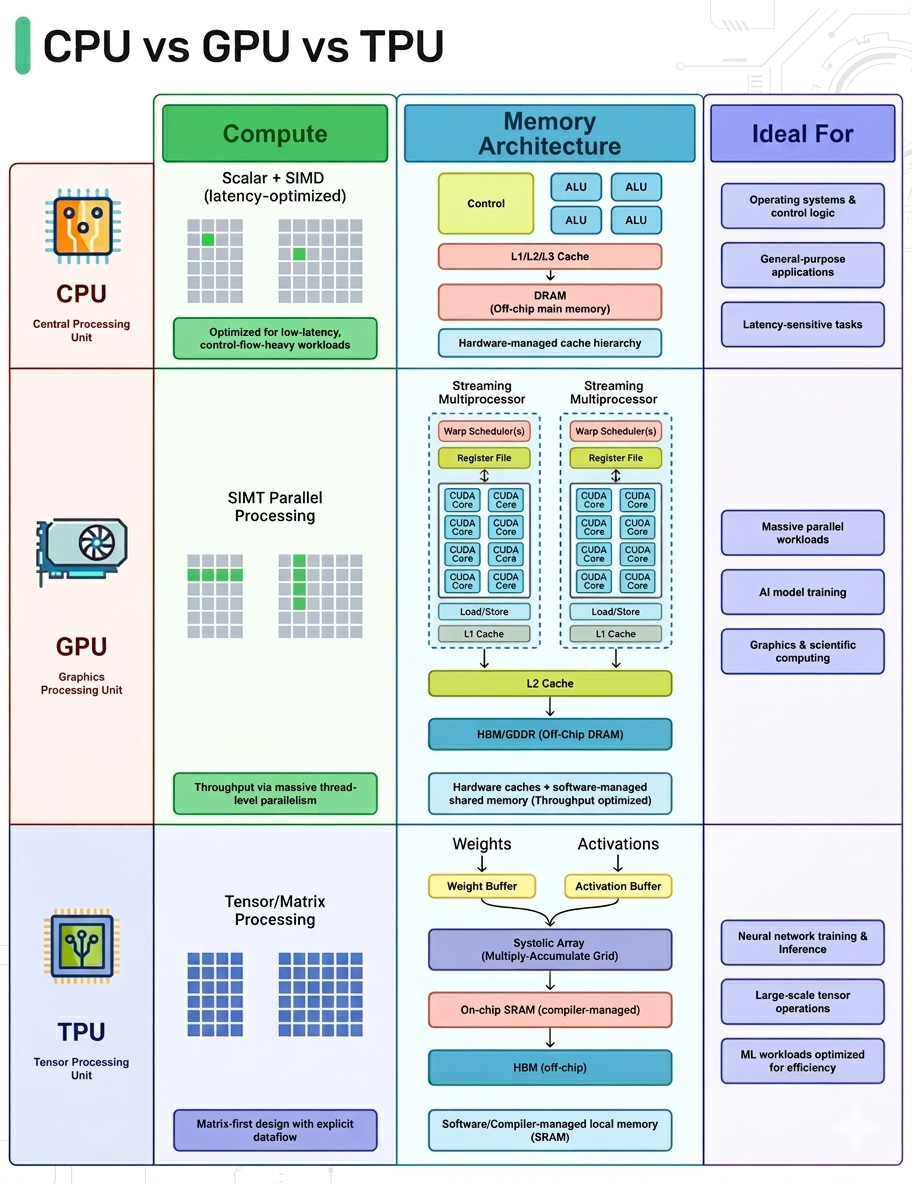
CPU (Central Processing Unit): The Generalist
- Design: Built for low latency, complex control flows, branching logic, and decision-heavy code.
- Architecture: Features a few highly capable cores.
- Best For: Operating systems, databases, and general application logic where flexibility is paramount.
GPU (Graphics Processing Unit): The Parallel Powerhouse
- Design: Built for high throughput and massive parallelism.
- Architecture: Spreads work out across thousands of smaller, simpler cores that execute the same instruction across massive datasets (SIMT/SIMD-style).
- Best For: Repetitive mathematical workloads like matrix math, pixel shading, and tensor operations.
TPU (Tensor Processing Unit): The AI Specialist
- Design: Custom-built Application-Specific Integrated Circuits (ASICs) designed specifically by Google for machine learning.
- Architecture: Designed around matrix multiplication using systolic arrays, featuring compiler-controlled dataflow and massive on-chip buffers for weights and activations.
- Best For: Neural network training and inference. They are unmatched in speed—provided your workload fits the hardware constraints.
How GPUs Work at a High Level
When engineers say GPUs are "powerful," what they actually mean is that they are built for massive parallelism. Here is what happens under the hood.
At the top level, a GPU chip is comprised of many Streaming Multiprocessors (SMs). Think of SMs as miniature parallel engines replicated across the chip. Inside each SM, you'll find:
- Warp Scheduler: Decides which group of threads (a warp) executes next.
- CUDA Cores: Dozens of cores executing instructions simultaneously.
- Register File: Stores thread-local data with ultra-low latency.
- L1 Cache: Provides lightning-fast, on-SM data access.
Each SM operates independently but is connected via an on-chip interconnect. Below this sits the L2 Cache (the coordination layer shared across all SMs) and the Memory Controllers, which interface with Global Memory.
The GPU Trade-off: Global memory has extremely high bandwidth but much higher latency than on-chip memory. GPUs hide this latency through massive parallelism; while a few threads wait on memory retrieval, thousands of others keep executing.